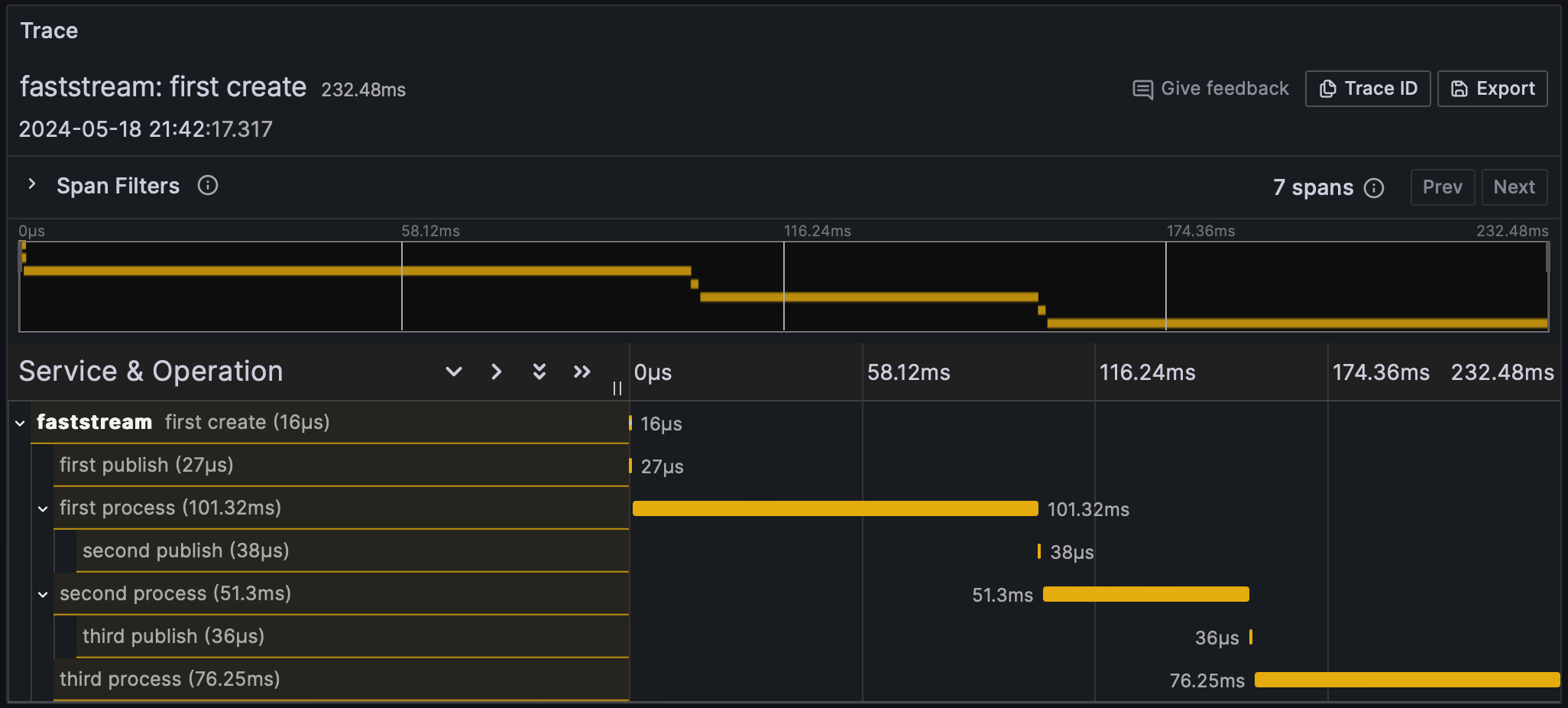
Tracing is a form of observability that tracks the flow of requests as they move through various services in a distributed system. It provides insights into the interactions between services, highlighting performance bottlenecks and errors. The result of implementing tracing is a detailed map of the service interactions, often visualized as a trace diagram. This helps developers understand the behavior and performance of their applications. For an in-depth explanation, please refer to the OpenTelemetry tracing specification.
Visualized via Grafana and Tempo
This trace is derived from the relationship between the following handlers:
OpenTelemetry middleware is supported only for MQTT 5. It is not compatible with MQTT 3.1.1, as that protocol version does not support user properties required for trace context propagation.
To visualize traces, send them to a backend system that supports distributed tracing, such as Jaeger, Zipkin, or Grafana Tempo. These systems provide user interfaces to visualize and analyze traces.
Jaeger: Run Jaeger using Docker and configure your OpenTelemetry middleware to send traces to Jaeger. For more details, see the Jaeger documentation.
Zipkin: Like Jaeger, Zipkin can be run using Docker and configured with OpenTelemetry middleware. For more details, see the Zipkin documentation.
Grafana Tempo: Grafana Tempo is a high-scale, distributed tracing backend. Configure OpenTelemetry to export traces to Tempo, which can then be visualized using Grafana. For more details, see the Grafana Tempo documentation.
Quite often it is necessary to communicate with other services by propagating the trace context. To propagate the trace context, use the CurrentSpan object: