Introduction Middleware#
Middlewares in FastStream allow you to process messages before and after they are handled by your code. This allows you to add common functionality to multiple handlers without duplicating code.
Middlewares help keep your business logic separate from the technical aspects of your application.
In this section, you will find a list of available middlewares and detailed information about how they work. You can also learn how to create your own middleware.
Basic: Middlewares Flow#
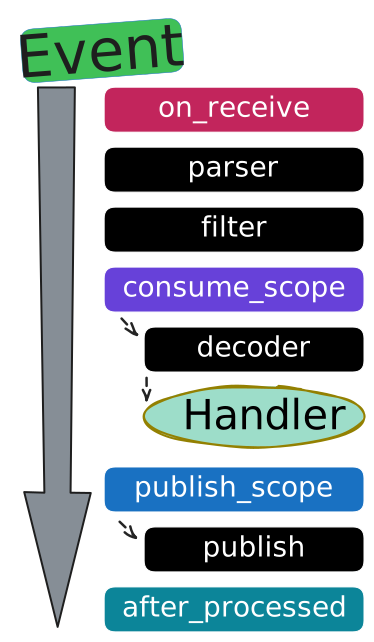
It is important to mention the parser, filter, decoder and publish - they are service functions, FastStream uses them during event processing. More details below:
- on_receive - This method is called first for every incoming message, regardless of whether the message will be processed.
- parser - Converts native broker messages (aiopika, aiokafka, redis, etc.) into FastStream's StreamMessage format
- filter - Applies filtering logic based on user-defined filter parameters.
- consume_scope - If the filter passes, the flow continues to the handler. Otherwise, the event will be passed to another handler.
- decoder - Deserializes message bytes into dictionaries or structured data.
- Handler - Executes the message handling function
- publish_scope - This method is called for every outgoing message, which includes messages sent via
@publisherdecorators, direct calls tobroker.publish()orbroker.request(), and any replies.- publish - The publish_scope calls the publish method, and the result of
consume_scopewill be used as the argument for sending the message.
- publish - The publish_scope calls the publish method, and the result of
- after_processed - Final cleanup and post-processing stage.
💡 The most common scenario#
1 2 3 4 5 6 7 8 9 10 11 12 13 14 15 16 17 18 19 20 21 22 23 24 25 26 | |
Middlewares can be used in Broker scope or Router scope.
🛠️ Full middleware methods#
1 2 3 4 5 6 7 8 9 10 11 12 13 14 15 16 17 18 19 20 21 22 23 24 25 26 27 28 29 30 31 32 33 34 35 36 37 38 39 40 | |
Pay attention to the order: the methods are executed in this sequence after each stage. Read more below in Middlewares Flow.
Important information about consume_scope#
The consume_scope method is called for each incoming message that passes through the filtering stage, right before the decoding stage.
Specifically, the consume_scope stage is triggered for:
- Messages processed by a decorated handler (
@broker.subscriber(...)). - Messages fetched manually using
subscriber.get_one()orasync for msg in subscriber:. - RPC responses received after a
broker.request()call.
Inside consume_scope:
- The
msg: StreamMessageobject is a native FastStream object, and its payload is still serialized. - You can differentiate the origin of the message using
msg.source_type, which can be: CONSUME: For regular subscribers (points 1 and 2 above).RESPONSE: For RPC responses (point 3 above).
Important information about publish_scope#
If you want to intercept the publishing process, you will need to use the publish_scope method. This method consumes the message body and any other options passed to the publish method (such as destination headers, etc.). So, you can patch them any way you want.
publish_scope affects all ways of publishing something, including the broker.publish(...) call and reply-to / RPC replies.
To differentiate between different types of publishers, you can use cmd.publish_type. It can be one of the following Enum:
PUBLISH: Regularbroker/publisher.publish(...)call.REPLY: Response to RPC/Reply-To request.REQUEST: RPC request call.
Batch Publishing
When you publish multiple messages at once using the broker.publish_batch(...) method, the publish_scope receives a BatchPublishCommand object. This object holds all the messages to be sent in its cmd.batch_bodies attribute. This feature is useful for intercepting and modifying the batch publication process.
✨ If the basic PublishCommand does not meet your needs, you can use the extended option. Here is an example:
1 2 3 4 5 6 7 8 9 10 11 12 | |
1 2 3 4 5 6 7 8 9 10 11 12 13 | |
1 2 3 4 5 6 7 8 9 10 11 12 13 | |
1 2 3 4 5 6 7 8 9 10 11 12 13 | |
1 2 3 4 5 6 7 8 9 10 11 12 13 | |
1 2 3 4 5 6 7 8 9 10 11 12 13 | |
1 2 3 4 5 6 7 8 9 10 11 12 13 | |
1 2 3 4 5 6 7 8 9 10 11 12 13 | |
📦 Context Access#
Middlewares can access the Context for all available methods. For example:
1 2 3 4 5 6 7 8 9 10 11 12 13 14 | |
🚀 Real examples#
🔁 Retry Middleware#
1 2 3 4 5 6 7 8 9 10 11 12 13 14 15 16 17 18 19 20 21 22 23 24 25 26 27 28 29 30 31 32 33 34 35 | |
📝 Summary#
Middlewares in FastStream offer a powerful mechanism to hook into the message processing lifecycle. Key points to remember:
- Order of execution matters - Methods are called in a specific sequence:
on_receive→ parser → filter →consume_scope→ decoder → handler →publish_scope→ publish →after_processed. - Comprehensive Publishing Hook: The
publish_scopemethod intercepts all outgoing messages, regardless of whether they are from a@publisherdecorator, a directbroker.publish()orpublisher.publish()call, or an RPCbroker.request(). - Chain of Responsibility: In order to ensure that the message continues through the processing pipeline, your middleware must call the next component in the chain. This is typically done by calling the
call_next()method with the message or command as an argument, or by using thesuper()function to call the implementation of the next method in the chain. - Context Access: All middleware methods have access to the FastStream context via
self.context. - Broker-specific extensions: If the basic publish command does not meet your needs, you can use the extended option. Here is an example: Use typed publish commands (
KafkaPublishCommandandRabbitPublishCommand) to access and manipulate broker-specific attributes when publishing messages.
To choose the right method for your needs, think about the stage you want to intervene in: on_receive for the initial message arrival, consume_scope to wrap the core processing logic, publish_scope for outgoing messages, and after_processed for post-processing and cleanup.